It has never been easier to start building a WordPress website.
An AI builder can generate a layout within minutes, while a language model can write code, suggest navigation and draft content. WordPress 7.0 moved further in this direction by introducing an AI Client in Core.
That progress is genuinely useful. I use AI throughout my own website work, and it has helped me produce better custom designs far more efficiently.
But easier building has created a new problem: it is now possible to begin constructing a website before properly understanding what the website is meant to do.
That is why learning how to plan a WordPress website still matters. AI can help with the execution, but it cannot replace the decisions that give a website its direction.
How to Plan a WordPress Website Around Its Purpose
Before I choose a theme, install a plugin or create a homepage, I define the purpose of the website in one sentence.
It should answer three basic questions:
- Who is the website for?
- What will it help them do?
- What should happen after they visit?
An affiliate publication, service business and online tool may all run on WordPress, but their content, pages and visitor journeys should not be identical.
If I cannot explain the purpose clearly, I am not ready to design the site.
This connects directly with why every website needs a clear purpose. The purpose is not a line of marketing copy added after the build. It influences almost every decision that follows.
Decide Who the Website Is Trying to Reach
“Everyone” is not a useful target audience.
I want to know what the intended visitor is looking for and what would make the site useful. That affects the language, page structure, content and calls to action.
When I plan a WordPress website, I consider the main journey a visitor is likely to take. They might arrive through Google on an article, read a related post and then click a recommended service. Alternatively, they might land on a service page, check the About page and use the contact form.
The homepage is not always the starting point. Planning only for someone who enters through the front door ignores how websites are actually discovered.
Plan the Content and Structure Before the Pages
I create a simple sitemap before I build the navigation.
For a small editorial website, that might include a homepage, About page, category archives, individual articles, contact details and the necessary privacy, cookie and affiliate disclosures.
I then decide which pages belong in the main menu and which belong in the footer. The same planning applies to categories. I prefer a small number with a clear role, each capable of supporting a useful collection of connected content.
Build SEO Into the Plan
SEO should not be something added after the site has been designed.
When deciding how to plan a WordPress website, I identify which subject each important page will cover, what search intent it serves and how it connects to the rest of the website. I also consider titles, headings, descriptive URLs, internal links and indexation.
Google’s own SEO Starter Guide recommends organising a site logically so that users and search engines can understand how its pages relate. That is a structural decision, not a setting that an SEO plugin can make on its own.
Plugins such as Rank Math or Yoast can help manage titles, descriptions, sitemaps and schema. What they cannot do is decide how the website’s pages, content and search goals should work together as a whole. A green score does not prove that a page answers the right query.
This is the point where simply assembling a WordPress site becomes very different from understanding how it actually works.
Installing WordPress, importing a template and changing the colours does not automatically make someone a developer. Some people sell websites without understanding search intent, heading structure, internal linking, crawlability or image performance. If those fundamentals are missing, claiming expertise in AI development is an even greater stretch.
AI has removed much of the time and technical friction involved in building a website. It also makes it easier to generate a badly planned website more quickly.
A capable WordPress professional does not need to be an SEO specialist, but they should understand how their decisions affect discovery, accessibility, performance and maintenance.
AI Is Changing WordPress—But It Still Needs Direction
WordPress 7.0 introduced an AI Client that allows WordPress to communicate with different generative AI providers. The official release highlighted features including title, excerpt, image and alternative-text generation.
AI website builders are also improving quickly. They can create first layouts, propose colour systems, generate copy and remove much of the friction involved in starting a project.
However, the output still needs judgement.
AI does not automatically know whether a homepage is trying to do too much, which page should target a keyword or whether two articles compete with each other. It may also generate code that works initially but creates a maintenance problem later.
I use AI as a practical collaborator. I give it a defined problem, test the result and refine it. I do not treat the first output as a finished website.
Why I Use Child Themes With AI
For many of my own sites, I begin with a dependable parent theme such as GeneratePress and create a child theme for the site-specific design.
The parent theme provides the stable foundation. The child theme contains the styling, templates and functions that make the website distinct. This keeps my changes separate so the parent can be updated without wiping out my work. The official WordPress child-theme documentation explains the same principle.
AI has made this approach far more accessible.
Across my own websites, I have used AI to refine homepage sections, article templates, content cards, FAQs, calls to action and responsive menus. This lets me move beyond standard theme controls while retaining ownership of the design.
The important word is help.
I still decide what the feature should do. I check the code, test it at different screen sizes and confirm that it fits the website’s content and SEO requirements.
A child theme is not necessary for a few colour or font changes made through the Customizer or Site Editor. It becomes useful when custom templates, PHP or substantial design work must survive parent-theme updates.
That control is valuable, but it can also make rebuilding WordPress websites too tempting when the existing foundation is already doing its job.
Choose Features Before Plugins
I do not begin with a list of popular plugins. I begin with a list of features the website needs.
That might include SEO controls, backups, security, caching, contact forms, custom fields, FAQ schema, reusable calls to action and analytics.
I then decide whether each feature belongs in WordPress Core, the theme, a small custom plugin, a third-party plugin or the hosting platform.
This helps avoid plugin bloat. Two plugins may overlap, add unnecessary scripts or solve a problem that does not exist. Every added dependency should have a clear purpose.
Plan Hosting and Performance Early
Hosting is easier to choose when I know what the website will contain.
A small blog has different requirements from a WooCommerce store or image-heavy publication. I consider traffic, storage, backups, server location, support, staging and how easily resources can be increased.
For my own WordPress websites, I currently use Hostinger Cloud. I wanted more resources than basic shared hosting could offer without taking on the work of managing a server myself. The speed-test results across my sites have been consistently strong, which gives me a genuine reason to recommend the service rather than selecting a host purely because it offers an affiliate programme.
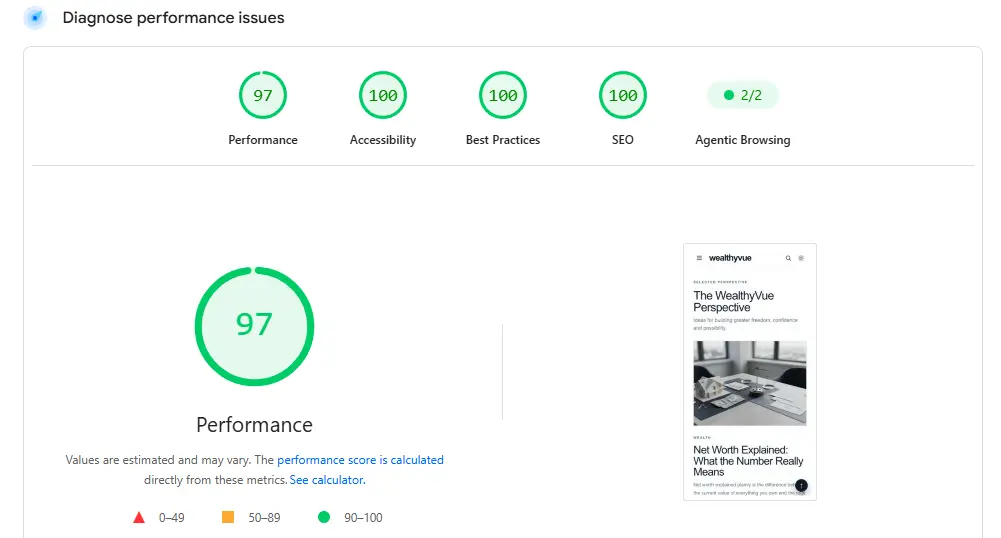
Mobile PageSpeed result
Desktop PageSpeed Result
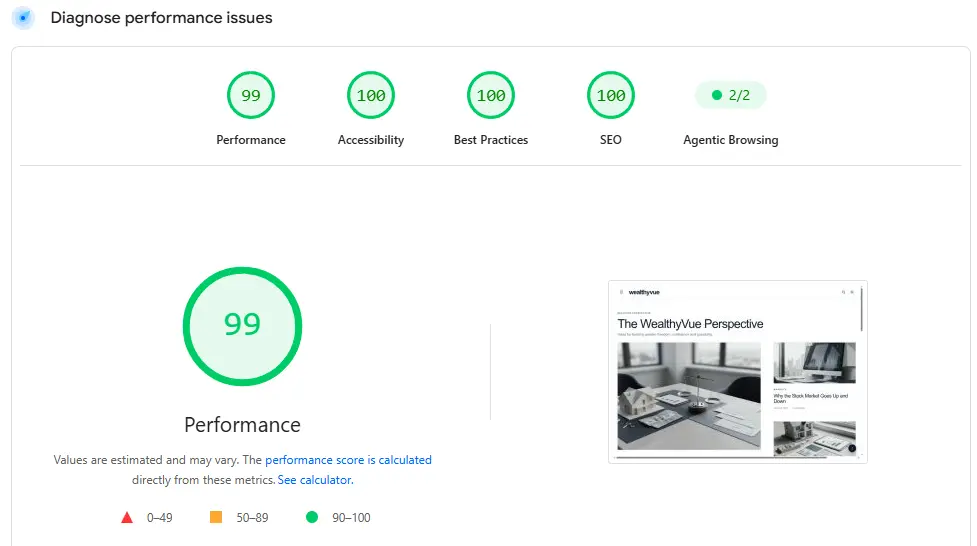
These PageSpeed Insights results are from one of my live WordPress websites running on Hostinger Cloud. Results can fluctuate between tests, but they demonstrate what is achievable when good hosting is combined with a lightweight theme, controlled plugins and properly compressed images.
Why not test your own website today? Run it through Google PageSpeed Insights to check its mobile and desktop performance, Core Web Vitals and potential improvements.
That does not mean hosting can solve every performance problem. A heavy theme, overlapping plugins, too many external scripts and poorly optimised images can still slow down a website running on good infrastructure. Hosting is the foundation, but the decisions made during the build determine how effectively that foundation is used.
This is why I plan hosting and performance together. It is far easier to make sensible choices at the start than to treat speed as a repair job after launch.
I Prefer to Compress Images Before Uploading Them
Images are one of the easiest ways to make a WordPress website unnecessarily heavy.
Compression plugins and content delivery networks can optimise images automatically, and both can be useful. However, I prefer to control the image before it enters the Media Library.
That is why I built ImageCom.press, a free tool for compressing images online. It lets me balance visual quality and file size before uploading an image to WordPress.
Automated tools are convenient, particularly on multi-author sites where uploads are harder to control. My preference is to remove unnecessary weight at source and avoid relying entirely on a plugin or service to make the decision for me.
I also plan dimensions, file formats, filenames and alternative text. Compression is only one part of image SEO and performance.
My WordPress Website Planning Checklist
Before I start the main build, I want clear answers to the following:
- What is the website’s purpose and who is it for?
- What action should a visitor take?
- Which pages and categories are required?
- Which search intent belongs to each important page?
- How will related content link together?
- Which features are genuinely necessary?
- Which theme foundation fits the project, and is a child theme needed?
- What hosting resources and server location are appropriate?
- How will images and other assets be optimised?
- What needs to be measured after launch?
A focused project brief and a simple sitemap are often enough. The value comes from making the decisions before design momentum takes over.
Planning Makes AI More Useful
Knowing how to plan a WordPress website is becoming more important, not less.
AI will continue to make development faster. That is progress, but speed magnifies the quality of the starting instructions. A clear plan gives AI something useful to work with; a vague idea produces a faster version of the same confusion.
My aim is not to resist AI or pretend that WordPress development should remain difficult. I use it to remove repetitive work, explore better designs and build custom features more efficiently.
The human work is deciding what deserves to be built.
That means understanding purpose, content, SEO, structure, performance and the people the website is supposed to serve. Get those decisions right and AI becomes a powerful building tool. Ignore them and even the most impressive builder will struggle to produce a website with lasting value.