Creating an attractive AI-generated person is relatively easy. Creating the same recognisable person repeatedly is where things become more difficult.
I had been using RenderNet to produce images of established digital personas. At the time of writing, the former RenderNet website redirects to a platform called Affogato.
The service provided a convenient way to preserve a character’s face while changing clothing, poses and surroundings.
It worked, but my usage varied.
Some months I might generate a substantial collection of images. During others, I might barely use it. Paying a recurring subscription began to make less sense when what I really needed was a focused image-generation tool that I could use occasionally.
That raised an interesting question:
Could I build my own private AI influencer image studio and pay only when I generated an image?
The answer turned out to be yes—but it wasn’t a one-click process.
Why I wanted my own AI influencer image studio
At the time of writing, the Standard subscription shown on the platform’s pricing page costs $24 per month. It includes 2,000 monthly credits, access to image and video models, credit rollover and standard support.
Unused credits can currently roll over to a maximum balance of 10,000 credits on that plan.
That could represent good value for someone generating images and videos regularly. My decision wasn’t based on the platform being universally overpriced. It was about whether a monthly subscription still suited my particular workflow.
I wanted something simpler:
- A private browser-based workspace
- A selector for different digital personas
- A box for describing the required image
- Preset locations and scenes
- Separate clothing and hairstyle controls
- Portrait, square, Story and website formats
- Control over facial consistency
- The option to generate one image or several variations
- No compulsory monthly subscription
These requirements became the foundation of my AI influencer image studio.
The idea was to connect the interface to an image-generation provider through an API. I would still pay for the processing, but only when I actually generated something.
Using ChatGPT to get the project started
I didn’t begin this project with a completed technical plan.
I started by explaining the problem to ChatGPT: I had cancelled my existing image subscription, but I still needed to produce consistent photographs of several digital characters.
The initial conversation helped me explore the realistic alternatives. These included running image models locally, using a hosted generation service and building a private interface connected to an external API.
We eventually settled on a practical structure:
- Train each digital character as a reusable model
- Use Replicate to provide the computing resources
- Build a private browser-based interface around the trained models
- Keep the API connection secure
- Pay for individual generations instead of maintaining another compulsory subscription
ChatGPT also helped me define a completely new character by asking structured questions about her apparent age, visual direction, personality and most recognisable features.
Once the character and workflow were decided, I used ChatGPT to help plan, build, troubleshoot and deploy Persona Studio. This included creating the interface, connecting it to the Replicate API, handling the private token connection and resolving production deployment problems.
It was still an iterative process.
I had to make the creative decisions, create the necessary accounts, secure the domain and social handle, prepare the training files, review the generated images and decide whether the character’s identity was consistent.
ChatGPT helped me turn an idea into a working tool without requiring advanced knowledge of AI training or API development.
Choosing Replicate for image generation
I chose Replicate as the generation provider for the first version.
Replicate is a pay-as-you-go platform that provides access to machine-learning models through an API. According to its official billing documentation, users are generally charged for the computing resources used to run a model. Some official models instead use predictable output-based pricing.
This approach also fitted with my wider interest in owning the platform rather than renting the audience.
I wasn’t trying to compete with the enormous commercial image platforms. I simply wanted a small, independent tool built around my own workflow.
Starting with an entirely new character
I already had two established digital personas with hundreds of images created over the previous year.
Those collections would provide plenty of material for training consistent models, but I decided not to begin with either of them.
Instead, I wanted to test the complete process by creating a new digital character from scratch.
The character needed to become the face of a future online project and work across varied social-media content. I didn’t want her identity to be defined by one narrow subject, outfit or setting.
Before generating anything, I worked through several basic questions.
What should people feel when they first see her?
Confident and glamorous.
What visual direction should she have?
International high-fashion.
What should be her most recognisable characteristic?
Strong facial structure.
The final face had dark hair, striking light eyes and sharply defined features. She looked distinctive without relying on an unusual hair colour, excessive makeup or elaborate styling.
Once I had settled on her appearance, I chose a name and secured the matching domain and social-media handle.
That might sound premature, but a digital character intended to support a genuine project needs more than an attractive face. The name, domain and social identity need to work together.
I’m keeping those details private while the project is developed.
Building the training set
An ordinary text prompt can describe someone in considerable detail, but it doesn’t permanently lock their identity.
The eye colour may change between images. The jaw becomes narrower. The nose changes shape. A character who looked distinctive in the first portrait can gradually turn into a fairly generic AI-generated model.
To improve consistency, I needed to train a model to recognise the new character.
I created a collection of reference images showing her at different distances and from different angles. The set included close portraits, upper-body compositions and full-body images.
Variety is important here.
If every training image uses the same pose, outfit and background, the model may begin associating those elements with the person. If the dataset contains only close-up portraits, it may struggle when asked to generate a convincing full-body scene.
I also avoided filling the training set with radically different hairstyles, apparent ages or heavily obscured faces. The model needed enough variation to understand the character without receiving contradictory information about her identity.
The objective was to teach it who the character was without accidentally teaching it that she must always wear the same clothing or stand in the same studio.
Training the character with FLUX
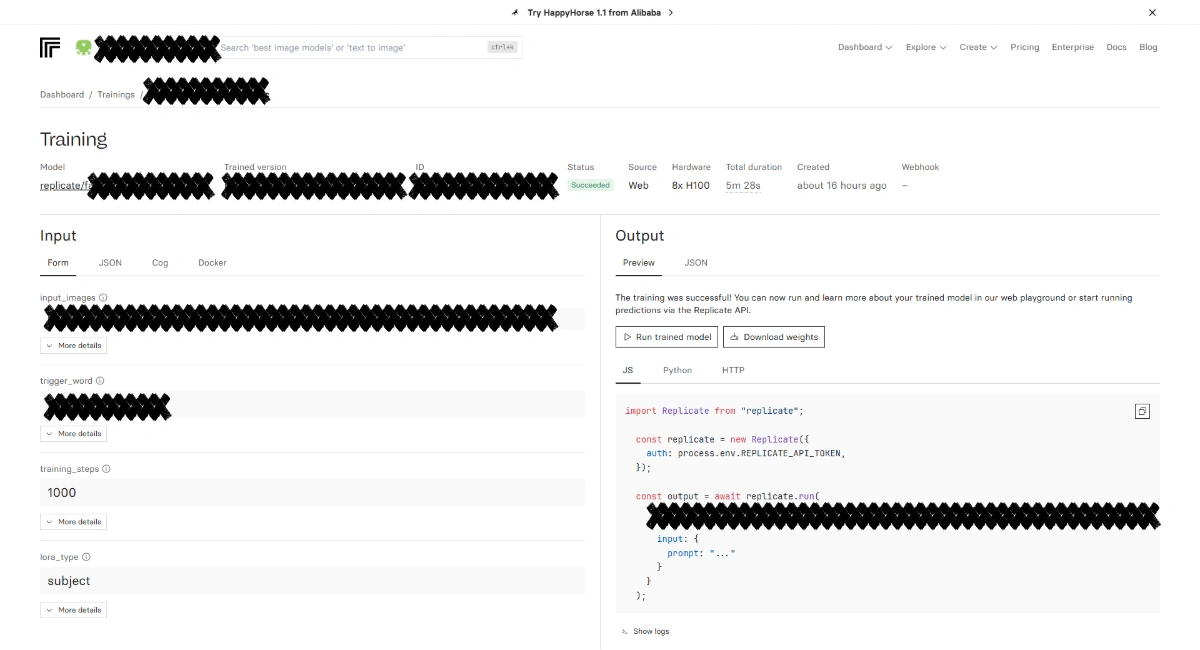
I uploaded the dataset to Replicate’s fast FLUX trainer and trained it as a subject LoRA.
A LoRA is a relatively lightweight set of trained adjustments that teaches an existing image model about a specific person, object or visual style. It doesn’t require building a complete image model from the beginning.
I assigned the character a unique trigger word.
Including that trigger in future prompts tells the model that I want my trained character rather than a random person matching the written description.
The training ran for 1,000 steps and completed in a little over five minutes.
Training produced a reusable model version stored inside my Replicate account. Once it existed, I could generate new images without repeating the training process each time.
There was a one-off computing charge for training, while subsequent images were charged separately when generated.
Training costs can vary according to the trainer, hardware, duration and settings. Anyone following a similar process should check the current price before starting.
Testing whether the identity worked
My first test was a simple editorial portrait.
The character appeared against a neutral background wearing a black tailored outfit. Her face looked consistent with the original design, but a close portrait was the easiest possible test.
The more revealing experiment was a full-body street photograph.
I changed the framing, clothing, background and pose. She was now walking down a European-style street in a white top and black trousers.
Her face remained recognisable.
That result showed that the training had captured more than one original portrait. The model could preserve her general identity while allowing the composition to change.
It wasn’t mathematically identical—and AI image consistency is never perfect—but it was strong enough for the intended purpose.
Building the AI influencer image studio
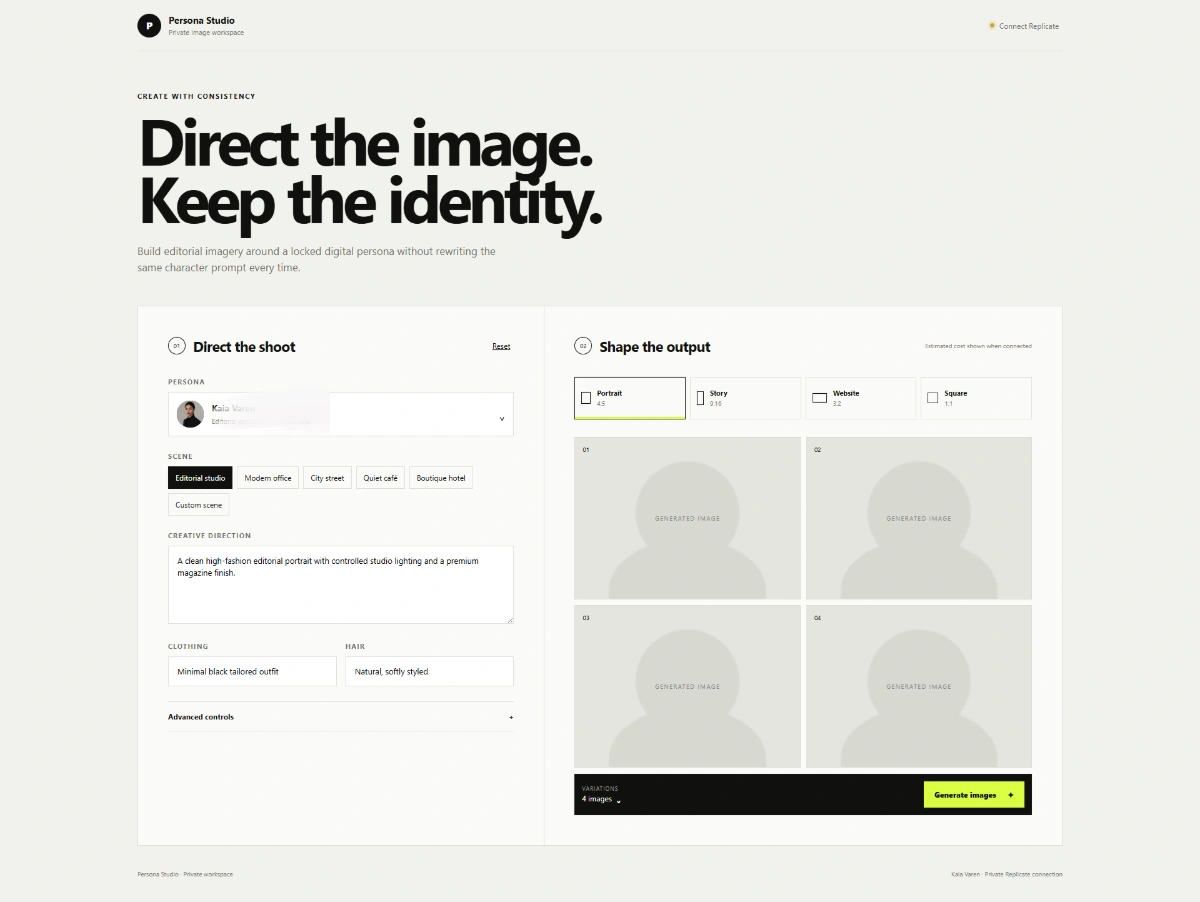
Once the trained model worked, I built the private interface around it.
I called the application Persona Studio.
The first version includes:
- A digital-persona selector
- Preset and custom scenes
- A creative-direction prompt
- Clothing instructions
- Hairstyle instructions
- Portrait, Story, website and square formats
- Negative-prompt controls
- Identity-strength adjustment
- A choice of image variations
- Generated-image previews and downloads
Persona Studio is essentially a private AI influencer image studio built around my own trained characters and publishing workflow.
The new character is currently the first trained model in the system, but the interface is designed so my existing personas and future characters can be added later.
The important difference is that I no longer need to rewrite the character’s complete physical description every time.
Her trained model contains the identity. Persona Studio lets me direct the new photograph by choosing the setting, clothing, hairstyle, composition and required format.
Connecting Persona Studio to Replicate
The website does not generate images by itself. It sends each request to Replicate, which runs the trained model and returns the completed image.
Replicate provides the processing power behind the AI influencer image studio, while my interface controls the creative direction.
That connection requires a private API token.
I didn’t want the token exposed in the website source or permanently embedded in front-end code. Persona Studio therefore has a private connection process that stores the token securely using an HTTP-only browser cookie.
The token is not included in the image prompt or displayed inside the public interface. If I clear my browser cookies, use another browser or disconnect the service, I have to connect it again.
Persona Studio also remains owner-only. It isn’t a public image generator where visitors can consume my Replicate balance.
The deployment wasn’t completely smooth
Building the visible interface was the straightforward part. Getting everything deployed reliably created more problems.
The first hosted version loaded, but it was only the interface. It could not yet generate images.
When I added the Replicate connection and generation routes, the production build initially failed to publish correctly. An oversized cache directory had accidentally entered the project history, causing the source upload to be rejected.
The application itself wasn’t broken. The deployment package was simply carrying a large amount of unnecessary local build data.
I removed the cache from the published repository, rebuilt the application and deployed a clean production version.
The finished site retained the same private address, so future updates can be published without changing my bookmark.
It was a useful reminder that creating an AI tool involves more than choosing a model. Authentication, API handling, deployment, privacy and cost control all matter.
It echoed something I had already learned from rebuilding WordPress websites: changing tools or rebuilding an interface is rarely the complete answer. A useful project needs a clear purpose and a stable workflow behind it.
What does each image cost?
During my initial testing, one generation cost approximately $0.05.
That figure should not be treated as a permanent fixed price. Replicate charges depend on the model, hardware, processing time and output settings. Its pricing and the cost of individual models may change.
At the time of writing and based on my initial cost of approximately $0.05 per image:
- One image costs around $0.05
- Four variations cost around $0.20
- Twenty images cost around $1
- One hundred images cost around $5
- Four hundred and eighty images cost around $24
This creates a useful comparison.
At the time of writing, $24 is also the monthly price of the Standard subscription I had been considering. At an estimated $0.05 per Replicate image, that amount would fund approximately 480 Persona Studio generations.
The two options may cost the same each month, but they do not provide directly comparable usage.
Subscription credits do not necessarily equal individual images. Different models, image settings and video generations can consume different numbers of credits.
A subscription also includes an established interface and access to multiple image and video models without requiring the user to build or maintain anything.
My AI influencer image studio makes more sense for me because I want a focused tool and my monthly usage fluctuates. Someone creating large volumes of images and videos may receive better value and greater convenience from a subscription plan.
All prices and allowances mentioned here were accurate at the time of writing and may change.
Controlling identity strength
One of the most useful additions is identity strength.
Setting this too low gives the model more creative freedom, but the character’s face can drift. Setting it too high can make the face appear unnaturally fixed or limit how well the model follows a new pose and lighting setup.
For my tests, an identity strength of approximately 0.85 produced a good balance.
As a general starting point:
0.70–0.80allows greater creative freedom but more identity drift0.82–0.88provides a practical balance0.90–1.00creates a stronger facial lock but may restrict the result
This isn’t an absolute rule. Different models, prompts and compositions may require adjustments.
My approach is to generate one inexpensive test image first. If the face drifts, I increase the identity strength. Once the character and creative direction look right, I can request four variations.
This means I can refine the prompt before paying to generate more versions that still miss the mark.
Was building an AI influencer image studio worthwhile?
Yes—but not because I discovered a way to generate unlimited images for free.
I still pay for model training and each image generation. I am also responsible for maintaining the interface and adapting it if an API or model changes.
Someone who wants everything prepared and supported from the beginning may be better served by an established subscription platform.
What I gained was control.
I now have a private tool designed around my digital characters and publishing workflow. There is no compulsory monthly image subscription, and I can add new trained personas when I need them.
More importantly, I now understand the complete process behind the finished image.
The project moved from an initial character idea to a named digital identity, a secured domain and social handle, a trained FLUX model and a working private generation tool.
Building my own AI influencer image studio gave me control over the characters, interface, privacy and generation costs.
That learning curve was the most valuable part of the project.